Showing posts with label Google Glass. Show all posts

4/08/2014

Google Glass in Warehouse Automation

Imagine that you operate a huge warehouse, where you store all the awesome goods you sell.
Well, one of our customers does.
For instance, if you run a supermarket, your process consists of at least these major modules:
  1. Online order management & checkout.
  2. Order packaging.
  3. Incoming goods processing and warehouse logistics.
  4. Order delivery.
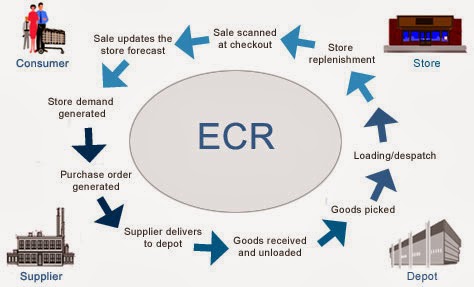
Here's an oversimplified picture of your flow:
Modern Supply Chain
Source: http://www.igd.com/our-expertise/Supply-chain/In-store/3459/On-Shelf-Availability

If you relax for a minute, you could probably brainstorm several ideas of how Google Glass can be applied in warehouse.
But let's focus on 1 link on that picture: "Goods received and unloaded". If you break it down into pieces, it seems to be a rather simple process:
  1. Truck comes to your warehouse.
  2. You unload the truck.
  3. Add all items into your Warehouse Management system.
  4. Place all items into specific place inside the warehouse.
But it gets complicated, when you need to enter specific data manually: expiry dates, amount, etc. We thought about optimizing person's performance during this phase. Would it be great, if you could just
  1. pick a box with both of your hands
  2. handle it to the shelf
  3. go back to the truck & repeat
On one hand, you have some spare seconds, when you grab a box and handle it. On the other, Google Glass has camera and voice recognition.

We combined both of the approaches. And that's what we created:


Pretty cool, yeah? Here you can see automation of all basic tasks we mentioned above. It is incredible how useful Google Glass is for warehouse automation.

In the next section we're going to dive deep into technical details, so in case you're software engineer you can find some interesting pieces of code below.

Working with Camera in Google Glass

We wanted to let person grab a package and scan it's barcode at the same time. First of all, we tried implementing barcode scanning routines for Glass. That's great that Glass is actually an Android device.
So, as usual, add permissions to AndroidManifest.xml, initialize your camera and have fun.
<uses-feature android:name="android.hardware.camera" />
<uses-feature android:name="android.hardware.camera.autofocus" />

<uses-permission android:name="android.permission.CAMERA" />
<uses-permission android:name="android.permission.RECORD_AUDIO" />
But wait, what the hell is going on? Why does my screen shows something similar to this:


Glass is a beta product, so you need some hacks. When you implement surfaceChanged(...) method, don't forget to add parameters.setPreviewFpsRange(30000, 30000); call. Eventually, your surfaceChanged(...) should look like this:

public void surfaceChanged(SurfaceHolder holder, int format, int width, int height) {
    ...
    Camera.Parameters parameters = mCamera.getParameters();
    Camera.Size size = getBestPreviewSize(width, height, parameters);
    parameters.setPreviewSize(size.width, size.height);
    parameters.setPreviewFpsRange(30000, 30000);
    mCamera.setParameters(parameters);

    mCamera.startPreview();
    ...
}
That's the way you can make it work.
P.S. Unfortunately, Glass has now just 1 focus mode -- "infinity". I hope, things will get better in the future.

Working with Barcodes in Google Glass

Once you see a clear picture inside your prism, let's proceed with barcode scanning. There're some barcode scanning libraries out there: zxing, zbar, etc. We grabbed a copy of zbar library and integrated it into our project.
  1. Download a copy of it.
  2. Copy armeabi-v7a folder and zbar.jar file into libs folder of your project.
  3. Use it with camera:
Initialise JNI bridge for zbar library:
static {
    System.loadLibrary("iconv");
}
Add to onCreate(...) of your activity:
setContentView(R.layout.activity_camera);
// ...
scanner = new ImageScanner();
scanner.setConfig(0, Config.X_DENSITY, 3);
scanner.setConfig(0, Config.Y_DENSITY, 3);
And create Camera.PreviewCallback instance like this. You'll scan image and receive scanning results in it.
Camera.PreviewCallback previewCallback = new Camera.PreviewCallback() {
    public void onPreviewFrame(byte[] data, Camera camera) {
        Camera.Size size = camera.getParameters().getPreviewSize();

        Image barcode = new Image(size.width, size.height, "NV21");
        barcode.setData(data);
        barcode = barcode.convert("Y800"); 
        int result = scanner.scanImage(barcode);

        if (result != 0) {
            SymbolSet syms = scanner.getResults();
            for (Symbol sym : syms) {
                doSmthWithScannedSymbol(sym);
            }
        }
    }
};
You can skip barcode.convert("Y800") call and scanner would still work. Just keep in mind that Android camera returns images in NV21 format by default. zbar's ImageScanner supports only Y800 format. That's it. Now you can scan barcodes with your Glass :)

Handling Voice input in Google Glass

Apart from Camera, Glass has some microphones, which let you control it via voice. Voice control looks natural here, although people around you would find it disturbing. Especially, when it can't recognize "ok glass, google what does the fox say" 5 times in a row.
As you can remember, we want to avoid manual input of specific data from packages. Some groceries have expiry date. Let's implement recognition of expiry date via voice. In this way, a person would take a package with both hands, scan a barcode, say expiry date while handling a package and get back to another package.
From technical standpoint, we need to solve 2 issues:
  1. perform speech to text recognition
  2. perform date extraction via free-form text analysis
Task #1 can be solved via Google Speech Recognition API in Android. In order to use it from Glass, you need to use default Android Intents:
Intent intent = new Intent(RecognizerIntent.ACTION_RECOGNIZE_SPEECH);   
intent.putExtra(RecognizerIntent.EXTRA_PROMPT, "Say expiry date:");   
startActivityForResult(intent, EXPIARY_DATE_REQUEST);
And override onActivityResult(...) in your Activity, of course:
@Override
protected void onActivityResult(int requestCode, int resultCode, Intent data) {
    if (resultCode == Activity.RESULT_OK && requestCode == EXPIARY_DATE_REQUEST) {
        doSmthWithVoiceResult(data);
    } else {
        super.onActivityResult(requestCode, resultCode, data);
    }
}

public void doSmthWithVoiceResult(Intent intent) {
    List<String> results = intent.getStringArrayListExtra(RecognizerIntent.EXTRA_RESULTS);
    Log.d(TAG, ""+results);
    if (results.size() > 0) {
        String spokenText = results.get(0);
        doSmthWithDateString(spokenText);
    }
}
Once we have free-form text from Google Voice Recognition API we need to solve task #2: get contextual information from it. We need to understand, which date is hidden behind phrases like:
  • in 2 days
  • next Thursday
  • 25th of May
In order to do this, you can either write your own lexical parser, or find a third-party library for that. Eventually, we found an awesome library called natty. It does exactly this: it is a natural language date parser written in Java. You can even try it online here.
Here's how you can use it in your project. Add natty.jar to your project. If you use maven, then add it via:
<dependency> 
    <groupId>com.joestelmach</groupId>
    <artifactId>natty</artifactId>
    <version>0.8</version>
</dependency>
If you just copy jars to your libs folder you'll need natty with dependencies. Download all of them:
  • stringtemplate-3.2.jar
  • antlr-2.7.7.jar
  • antlr-runtime-3.2.jar
  • natty-0.8.jar
And use Parser class in your source:
// doSmthWithDateString("in 2 days"); 

public static Date doSmthWithDateString(String text) {
    Parser parser = new Parser();
    List<DateGroup> groups = parser.parse(text);
    for (DateGroup group : groups) {
        List<Date> dates = group.getDates();
        Log.d(TAG, "PARSED: " + dates);
        if (dates.size() > 0) {
            return dates.get(0);
        }
    }
    return null;
}
That's it. natty does a pretty job of transforming your voice into Date instances.

Instead of Summary

Glass is an awesome device, but it has some issues now. Even though it's still in beta, you'll get tons of joy, while developing apps for it! So grab a device, download SDK and have fun!
P.S. You can find full source code for this example here: https://github.com/eleks/glass-warehouse-automation.

2/21/2014

Why Google Glass will fail and why this won’t stop smartglasses’ success

Smartglasses are probably the most promising kind of wearable devices currently on the market. And Google Glass is the most interesting device among them. Yes, Google Glass is sexy and cool. It has great design; it is small and futuristic. After all, it feels like a typical Google product - simple and great. Nevertheless, I think it won't be successful as a product and will eventually fail.
Disclaimer: the following is my own opinion and does not express the official position of ELEKS or its R&D team. In fact, some of the team members argue with me a lot that Glass is the best device ever, it will conquer the world and other things like that. Of course, I'm exaggerating here a bit, but still it looks very likely for me that Glass will eventually fail as a commercial product.
So, what's the problem with Google Glass? Well, there are two aspects of it:
1. The device itself. I'll dwell upon its drawbacks in the next section.
2. Its positioning and marketing. I'll show you some interesting historic analogies below and try to project them on to the future.

Five Reasons Why Google Glass Sucks


So, what's wrong with the device? When you watch the ads or listen to Google employees who evangelize Glass, it looks so futuristic and cool that you're starting to believe the future is here and search for the Order button. But things change when you actually get it. We bought one for our R&D team a few months ago and... well, I wouldn't say it is a big disappointment but the device is very far from being market-ready. Here is the list of 5 things that we found very annoying about Google Glass:

11/12/2013

Google Glass: Consumer Device in Enterprise World

You've heard of Google Glass, you have the basic idea of what it does, but you're not sure how it touches you. Right? Then we have something to talk about.
In this article I'm going to shed some light on what it is(and what it's not), how it fits into the enterprise(and how it doesn't), and finally - how can you benefit from it and what will stop you from doing it. You'll also find lots of examples down the road. So, let's start!

Englishman in New York Google Glass in Enterprise

What it is
Well actually it is anything but glasses - it's just a computer with camera, attached to your head:) But let's go step by step.
First of all, we have Android on board, i.e. a POSIX-compatible operating system, which means we could do almost anything we’ve done on mobile phones or desktop computers. The issue is that, as of now, the only official way to build apps for Glass is limited to showing pictures and text. But, unofficially Google lets us use all the features, and as the community is demanding, it seems like a matter of time when it will be official.
Second, we have a smart screen. Why is it smart? Because it’s there when you need it, and gone when you don’t. At least they say so:). The screen turns on on notifications, which you are subscribed to, and manually, by nodding your head lightly. And actually it’s not a screen, it’s projection into infinity. When I tried Glass it took me 5-10 minutes to get used to this.
Then, we have a voice control! That means that we don’t actually need to press any buttons and can keep our hands free. That’s a huge feature. Of course, there’s still a touch pad to cover cases when you want to remain silent. And speaking of sound…they’ve been experimenting with it. Let’s just say that Google Glass can produce sound.
Next, we have a camera, comfortably sitting on your head and seeing everything you see. Most of glass explorers say it’s a killer feature, actually the one that makes glass worth buying. Sharing video while doing your job, gives us a whole new set of opportunities.
And last is the connectivity module. We have Wi-Fi to be self-sufficient, but mostly Glass pairs with mobile phone via Bluetooth and gives us 3G or LTE network together with GPS tracking.
I didn't mention some minor Glass' parts, but you can have a look here for more details.

What it's not
There have been a lot of myths going through the Internet about Google Glass, and I’d like to bust some of them. So, what Google Glass doesn’t do?

First of all it doesn’t do augmented reality. You don’t see the world through the Glass, you see Glass’ screen on top right corner of your view field. So it just doesn’t fit.
Second, you can’t use the camera “secretly”. Google has foreseen this threat and made a design decision to avoid such cases. So, to take a picture we’ll have to say “OK Glass, take a picture” or lift our hand towards our head and press the touch pad. Same goes for video, but while recording, the screen is on, so people will notice you filming them.
Similar situation with face recognition. Google has cut out all standard libraries for face recognition, and also doesn’t allow such applications into their official "store". It is technically possible to implement it but is probably illegal. Yet.
And again the screen. I’ve heard lots of complains that a constant screen in one’s view field will drive people crazy. As I said, the screen is off most of the time and turns on when you need it. Period

Enterprise
Now we're getting to an interesting part. How can we apply it to the enterprise. I'll start from the examples.

Healthcare
Recently Philips together with Accenture have published results of their experiment with Google Glass, which was focused on healthcare. Functionality varied from integrating with Medical Records System, helping managing patients, showing vital signs during the operation and much more.

Warehousing
Another giant, SAP, together with Vuzix have produced their own glasses, specialized for this type of workers. As their demo shows, warehouses workers use optimized path finding, identifying needed palette, scanning barcodes, fixing technical issues by connecting to remote technician and streaming their video.


Maintenance/Tech support
Speaking of tech support, the whole procedure could be simplified, by providing busy technicians with this smart assistant. They could contact their peers and share their screen, look up repair history or take a quick look into the instruction guide while working, and all hands-free!
What's even more important, is that engineers, who use handheld devices at work are actually distracted by them. Moving this device to the default view field would make it more safe.

When is it worth it?
So, following these examples, how do we know when it’s actually worth considering investments into wearables?
Let’s take a look at typical enterprise mobility model. We have field workers, and we equip them with mobile devices, mobile applications and access to corporate network. In return we strongly increase their productivity and improve the business process. Now, there’s this type of workers, whose job requires intensive hand usage. If we equip them with wearable, i.e. hands-free devices, we would not just optimize their work flow, we would also increase their safety. So the key driver to adopting Google Glass-like devices in enterprise is the presence of hands-intensive workers, which would benefit from assistance.

But that’s just the tip of the iceberg. Why limit ourselves with B2E apps? It’s actually more probable that wearables will come into the enterprise from customer side, as it’s a consumer device. A very bright example is banking.

Banking
Most of us already know how important mobile banking is for the customers, and Google Glass could take it to another level. My favorite Google Glass ad is from one of the leading Ukrainian banks PrivatBank, where they show how Glass can simplify our lives. It includes buying things by just taking a look at them, loading car with fuel without even leaving it, finding the ATMs and withdrawing money without the card, and much much more. 

Learning
This is an area where glass explorers have already done a lot. I'll give 2 bright examples
1. A doctor making a knee operation while video-streaming his actions to the students.
2. A physicist having a lesson with his class, while cycling around Hadron Collider
There's also a nice article focused on Google Glass' role in education.

Sports
This is an area where we at ELEKS decided to experiment, as one of the most fruitful sources for integrating wearables into the process and thus expanding interaction scenarios. We've shown how race sports can be changed by equipping participants with live map and leader board, or how group sports can be changed by equipping players with live radar and possibility to see what teammates' see and much more. You can see the interactive video at glass.eleks.com.

Advertising

And what about e-commerce? Retail? Advertising? Public services? At this point wearables come into a perfect combination with contextual awareness. Imagine coming into the airport and automatically receiving notification about your registration desk number, departure gate and flight status. I recommend watching the presentation on NoUI concept and wearables for a bigger picture.

When is it worth it?#2
So Glass can be a very good way to reach your audience. And think of it - these people have consciously put a computer on their head and encouraged you to interact with them in such way. So its probably not a mainstream part of your audience.

Challenges
But let’s step away from the perfect world and face the reality. There is couple of major issues with implementing wearables in the enterprise.

Battery
Seriously, Google glass can take 40 minutes watching youtube, 4 hours standard mode(I didn't expect more from Android:)). There is a great struggle between producing more powerful batteries and wearing them on your head. So good luck here.

Security
We are still in the process of handling current security issues, and bringing this new type of device would cause tones of new concerns. Yes, Google Glass has a good theft protection, but authentication needs to be improved. Also, I imagine, coming to a secure workplace with a camera on your head may be an issue.

User Experience
As I said, screen is smaller, and obviously the interaction is different, so we again need to adapt application logic to it. There are special UX guidelines for building apps for Glass. So we can’t, or at least shouldn’t simply port mobile apps to Glass, just like we shouldn’t port desktop websites to mobile phones. They need to be reconsidered and rebuilt with new usage context in mind.

Priority
I believe most of you have more important problems to solve right now, like BYOD, mobile strategy, teaching your enterprise engineers mobile development, learning about your employees’ workflows and habits, choosing between cross-platform tools or struggling to find a reliable third-party vendor to do this for you... I do not think that focusing main efforts on Glass implementation while having that much on your shoulders is the right thing to do. 

Mass Adoption
Currently there is 10 000 Google Glass items on planet. Comparing to several billions mobile devices. For now, Google Glass is kind of a futuristic device, something cool, unexplored and compelling. But people haven’t got used to it like they did with mobile phones. So adopting it now will take time, efforts and probably training.

And let me guess what you're thinking about right now - "last time we saw mass adoption in mobility, we ended up with BYOD!". So I feel a need to at least touch BYOW

Bring Your Own Wearable?

Obviously Google Glass is not the only "Glass". There is a whole set of other wearable devices: GlassUp, Telepathy, ReconJet, Meta SpaceGlasses and many others. So one could wonder whether BYOD will repeat again.
It’s not clear whether wearables have same future. As technology grows, we see a certain resistance from people to accept them as they become too smart. For example - are you OK with what Google Now does? I sometimes feel uncomfortable, lots of my friends turend it off. Let’s take a look at the numbers. In a recent survey 18% said they’d buy the device. 20% of people agreed that Glass should be banned. More than a half had privacy concerns.  And 69% demanded greater regulation of people wearing the devices in public places. So it remains a great question, whether this new kind of interaction will go massive.
But we have to admit it - Google Glass is the first and probably the only wearable device with potential for mass adoption. Google made a really good marketing job here, which I personally admire.
For more information you can also read this article by Forbes on BYOD and Glass.

What can I do now?
First of all, we have a lot of more important problems and brighter opportunities with mobile devices right now. And I don’t recommend focusing on Google Glass before having more or less stable mobile strategy.
But if you do, you have a whole new set of opportunities! Now, whenever you detect hands intensive job, you know that you can improve it by introducing wearables.
Also, if you’re looking for new ways to reach your customers, Google Glass may just be it – the most effective way to please your most modern target audience.
And although Google Glass is not in public sale yet, you can choose other wearables, or you start building apps for it today, without the device itself.

So, let me finish my saying this - implementing mobility into known business processes and changing them is inspiring. But introducing things like Google Glass, applying them  to the areas where they actually bring value, and being among the first people who've done it - that's just awesome! So let's do it, and let's do it together!

p.s. I've been lucky to get involved in introducing Glass into one of the complex business processes. So in near future you'll see a big success or failure story.

11/01/2013

Google Glass Development without Glass


Here are the slides of my "Google Glass Development without Glass" presentation. As I promised, here is the follow-up blogpost with some code samples. If you haven't seen my presentation, I strongly suggest clicking through the slides!

0.Intro

Technologies emerge. Extremely. Wearable trend takes over the world. It seems like every week we start with articles about brand new devices, which would change our life! We've heard about lots of glasses, watches, wristbands, you name it. The most popular one is definitely Google Glass. Actually, it is Glass, who started this wearable hype!
You can just imagine, how all the wearbles can impact our daily and extreme activities. Check out, how we imagined that at eleks: https://glass.eleks.com/

From the other point of view, each new device brings new UX, SDKs and APIs. That's why we, developers, have to quickly adopt to the new techs. In this sense, Google Glass is a rather good device for developers. It runs the world-known Android OS. It just has an extremely strange UI and UX.

Google created a set of "best practices" of awesome Glassware. Actually, it can be applied to any wearble software:
  • Design for device -- know & test your device and it's abilities. 
  • Don't get in the way -- show the best data when users want it and be out of the way when they don't.
  • Keep it timely -- platform is the most effective when in-the-moment and up-to-date.
  • Avoid the unexpected -- surprising users with unexpected functionality is bad. On any platform.
Glass is different from the regular phone or tablet. The usual way of creating Android apps is through the Android SDK. Because of specific Glass's usage principles, Google introduced Mirror API. We'll dive into both of them later in the post.

1. Obtaining Glass

If you are among those 10000 people, who have Glass, you can skip this chapter. Unfortunately, that's just 0.000002% of the world's population. So, welcome Stranger to this amazing world of Glass hacking without Glass.


Hopefully, you have some Android device. Then, you can install Google Glass UI there (disclaimer: I've tried this with Nexus 7 tablet with 4.2.2 rom and it worked perfectly, but I can't guarantee it will work on other device). In short, Google Glass UI is just another Home screen provider for your Android. In order to set it up, follow these steps:
  1. Go to: https://github.com/zhuowei/Xenologer
  2. Download Glass APKs: https://github.com/zhuowei/Xenologer#install
  3. Install them as you usually install APKs from third-parties
  4. Follow steps at http://imgur.com/a/IBqFf to set up your "Nexus Glass"
  5. Say "ok glass, take a picture" and share your "woohoo-reaction" with the world #throughglass
You've obtained Glass. Now its time to hack!
Let's dive into Glass development with the help of our friend Mr. Bond. James Bond.
Once upon a time, he was in London. Somehow, he's got his Google Glass and enjoys the experience on a daily basis.

2. Example #1: Mirror API

If you are eager to try Mirror API out and don't want to mess with quick-start projects, I have a shortcut for you!
Let's try inserting a simple card into Glass Timeline:
  1. Go to: Google API Explorer --> Mirror API --> mirror.timeline.insert 
  2. Authorise via OAuth 2.0. Use Glass scopes:
    • https://www.googleapis.com/auth/glass.timeline
    • https://www.googleapis.com/auth/glass.location
  3. Populate request fields with values from the API.
  4. Execute request!
  5. Here's a link with some pre-populated data.
Now it's time to have even more fun! Let's try setting up demo-project.
  1. Set up a new project in https://code.google.com/apis/console
  2. Go to API Access, update project settings:
    1. Add to Redirect URIs: 
      • http://localhost:8080/oauth2callback
    2. Add to JavaScript origins: 
      • https://plusone.google.com
      • http://localhost:8080
      • https://mirror-api-playground.appspot.com (will be useful later) 
  3. Clone https://github.com/googleglass/mirror-quickstart-java
  4. Update file src/main/resources/oauth.properties with the values provided in Google API Access Console.
  5. mvn jetty:run it.
If everything goes smooth, you'll be able to authorize and have fun with your Glass Timeline! If you want to have even more fun with Mirror API, especially with Subscriptions to Location and Notifications, you should deploy your war to the real webserver. Google sends these updates only to https secured web-sites. For development purposes you can use provided ssl-proxy. Just modify MirrorClient#insertSubscription method.

3. Example #2: GDK

Update: Google recently released GDK Sneak Peak. Right now, when you try creating apps with it and running it on Nexus Glass, you'll get [INSTALL_FAILED_MISSING_SHARED_LIBRARY]. We're trying to find the way, to avoid that. As of now, there's no support for the official GDK Sneak Peak (auth, live cards, etc).


Google Glass is just another Android device with 640x360 screen (hello, screen fragmentation), Android 4.0.4, API level 15. Maybe, in the next releases of Glass, this will change. Now, when you want to port your existing Android app to Google Glass, you should just:
  1. Build your APK.
  2. Install it.
  3. Run via adb.
  4. Understand, that you need to update touch gestures support.
  5. Understand, that your UI is hardly usable.
  6. Understand, that your awesome Google Maps stopped working.
  7. So, double-check your application on real device! Everything can change in the near future!
It's a good idea to check out Google Glass Quick Start by Google. It explains a lot about Timeline, UI, Gestures and current limitations of the GDK.
In order to support touch gestures of Google Glass, have a look at this article: Touch Gestures. In short, here's the table with events corresponding to keycodes:
TapKEYCODE_DPAD_CENTER
Swipe rightKEYCODE_TAB
Swipe leftKEYCODE_TAB + isShiftPressed()
Swipe downKEYCODE_BACK
CameraKEYCODE_CAMERA

4. Example #3: GDK + Timeline API

Update: Google released GDKvXE12 update. It has Static Card support, but it is still limited and lacks menus, html templates, etc. The code mentioned below follows hacky way and may not work on the latest version of Glass.
So far, we've tried the official Mirror API way and the hacky GDK road. Now its time to combine both approaches. Let's insert a card into Timeline from withing your app!

I've  set up a sample project at github for you: https://github.com/pif/ukrbash-for-glass. After you fork/clone it, you can see glasslib.jar inside libs folder. This library would probably become the aforementioned GDK. It provides everything you need to know about Timeline UI.

All the magic is done via these steps:
  1. Initialise Timeline, get Timeline contentresolver. Look at:
    com.andrusiv.glass.bash.GlassService#onStartCommand(Intent, int, int).
  2. Create MenuItems for your card.
  3. Create TimelineItem.
  4. Insert it into ContentResolver.
Look through the classes & methods provided inside glasslib.jar. I hope, you'll find loads of interesting information!

5. Outro

Thanks everyone, for reading all the way down here. I hope now you have your pseudo-Glass and know how to develop for it. Share your experience in the comments and on github! Ok guys, have fun #throughglass!